

🔧 Additional Clarifications for Step 3 (Based on Real‑World Experience Using Oracle Linux)
While following the migration steps, I found a few practical details that can help ensure a smooth setup—especially when installing and configuring the AWS MGN vCenter Client on an Oracle Linux VM.
Here is the article for step by step,
https://sudoconsultants.com/migrate-your-vms-to-aws-a-step-by-step-guide/
✅ Ensure Network Connectivity to vCenter
The VM running the AWS MGN vCenter Client must have uninterrupted network access to the vCenter Server.
If the MGN client cannot reach vCenter (firewall, routing, DNS, or port issues), the installation will fail or the service will not start properly.
Make sure the following are open and reachable:
- vCenter IP or hostname
- Port 443 (HTTPS)
- DNS resolution (if using hostname)
- No outbound restrictions blocking AWS endpoints
This is a critical requirement that is easy to overlook.
📝 Useful Input Details During the Installer Prompts
When running the installer script on Oracle Linux, you will be asked for several parameters. Below is a clear reference for each field
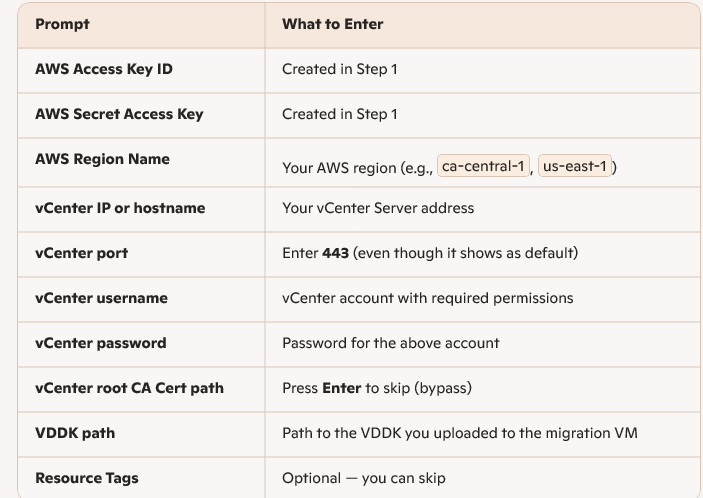
These details help avoid confusion during installation, especially when using Oracle Linux instead of Ubuntu.

 NetSideTech